What’s new?
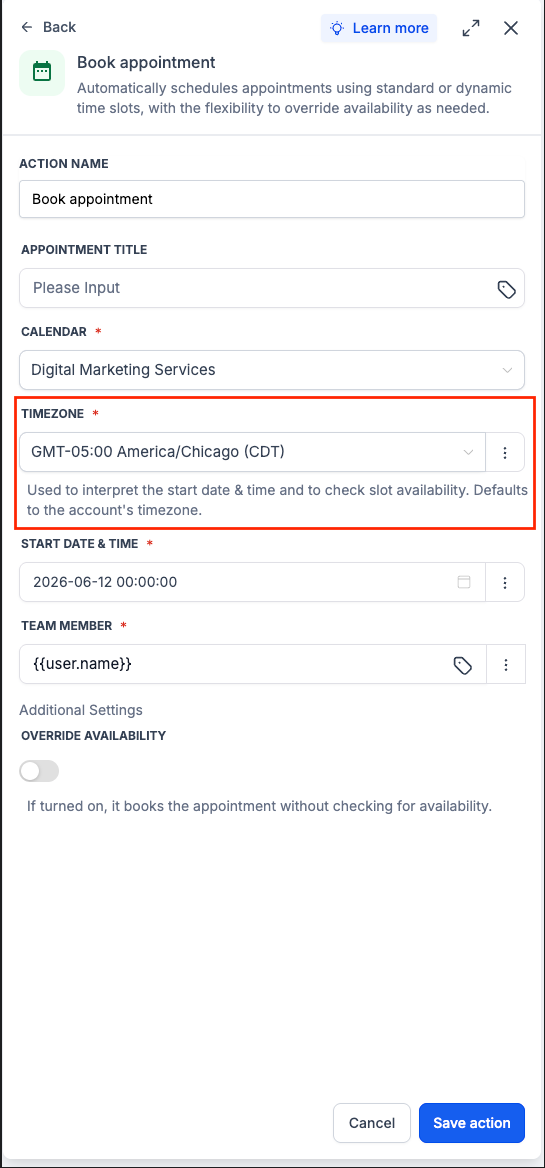
The Book Appointment workflow action now supports a Timezone field. You can choose a fixed timezone or use a dynamic value, including the contact’s timezone.
How it works
When the action runs, the Start Date & Time is read using the selected timezone, then the appointment is booked for the correct absolute time. If no timezone is selected, it defaults to the account timezone.
How to use it
Open the Book Appointment action in a workflow.
Set the Start Date & Time and choose a fixed timezone or Contact Timezone.
Save the action.
Why we built it
Dynamic appointment times could be interpreted in the wrong timezone, causing bookings to land hours off for contacts in different regions. This gives you direct control so appointments are scheduled at the intended time.
Notes & limitations
The action uses the account timezone by default, users can tweak it to a specific timezone
The timezone is used to interpret the Start Date & Time and check slot availability.
If Override Availability is turned on, the appointment is booked without checking calendar availability.
This update applies to the Book Appointment action only.
Preview
Was this article helpful?
That’s Great!
Thank you for your feedback
Sorry! We couldn't be helpful
Thank you for your feedback
Feedback sent
We appreciate your effort and will try to fix the article